
Makeblock Review 2026: Are Its Coding Robots and STEM Kits Worth Buying?
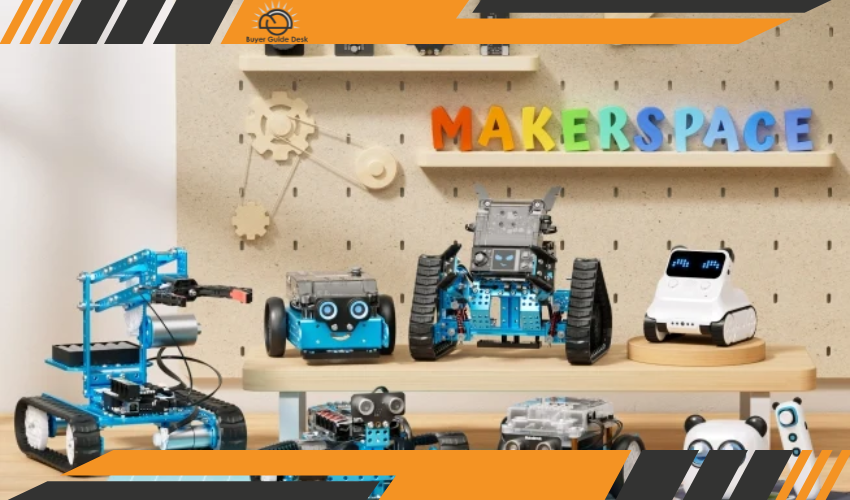
Makeblock occupies an interesting space in the educational technology market. Its products are part toy, part robotics kit, and part programming curriculum, with the goal of getting children from basic screen-free activities and block coding toward more advanced programming, electronics, robotics, and engineering. The company says more than 30 million people have used its products and that its education solutions have been adopted by more than 200,000 schools across more than 210 countries. Those are substantial claims, but they do not automatically mean every Makeblock product is worth its price. The better question is whether the hardware, software, lessons, and expansion possibilities create enough educational value to justify spending anywhere from roughly $70 for a basic mBot to $400 or more for advanced kits.
The strongest argument for Makeblock is its progression system. A child can start with a relatively approachable product such as mTiny or mBot, move into Codey Rocky or mBot2, and eventually use more advanced platforms such as mBot Ultimate, CyberPi, or mBot Ranger. The company also supports block-based programming and, depending on the product, Python, Arduino, and other more advanced development approaches. That means a good Makeblock purchase can remain useful as a learner develops rather than becoming obsolete after a few weekends. The catch is that the more advanced the kit becomes, the more the buyer needs to care about curriculum, supervision, compatible accessories, software support, and the child's actual interest in building and coding.
What Is Makeblock?
Makeblock is a STEAM education technology company that develops coding robots, robotics kits, educational software, classroom resources, and related creative tools. The company says it has been developing STEAM education solutions since 2013 and serves both families and educational institutions. Its current catalog ranges from early-learning products for young children to advanced robotics systems aimed at older students.
The brand is best understood as an ecosystem rather than a single toy company. Products are designed to connect hands-on construction with programming, sensors, motors, electronics, and project-based learning. The mBot, for example, is positioned as an introductory robotics kit, while mBot2 adds more sophisticated sensors, Python programming, and a more capable CyberPi control board. At the top end, mBot Ultimate offers ten different robot configurations and support for Scratch, Arduino IDE, and other advanced projects.
What Does Makeblock Sell?
The catalog is divided broadly by age and skill level. mTiny is aimed at younger children and focuses on screen-free learning, while Codey Rocky and mBot introduce more recognizable coding and robotics concepts. mBot2 is designed for children around age eight and up, while products such as mBot Ranger, CyberPi, and mBot Ultimate are intended for more advanced projects.
Makeblock also sells classroom packs, expansion modules, coding boxes, sensors, mechanical parts, and other accessories. This is an important part of the company's value proposition because the initial robot is not necessarily supposed to be the end of the learning journey. A family or school can add components and projects as the student's abilities develop. That flexibility can make Makeblock more economical over several years, but it can also make the ecosystem expensive if you start buying numerous add-ons without a clear educational goal.
How Much Does Makeblock Cost?
Makeblock has products at several price levels. The basic mBot is currently listed at $69.99, while mBot2 is $149.99, Codey Rocky is $139.99, mBot Ranger is around $169.99, and the mBot Ultimate is $399.99. The company also sells classroom packs, including six mBot2 units for $1,199.99.
That range is useful because families do not need to jump directly into a $300–$400 robotics kit. A $70 mBot can introduce basic electronics, robotics, and block coding at a relatively manageable cost. The more important value question is what you actually want the child to learn. Paying $150 for mBot2 makes considerably more sense if the student is ready for sensors, more sophisticated robotics projects, and Python than if they are still learning basic programming concepts. The same principle becomes even more important with the $399.99 mBot Ultimate.
Is the Makeblock mBot Worth It?
The original mBot is probably the easiest Makeblock product to recommend to a beginner. It is currently priced at $69.99, is designed for ages eight and up, can reportedly be assembled in around 15 minutes, and includes beginner-oriented projects and coding activities. The company says learners can start with block-based coding and eventually transition toward text-based programming.
Its biggest strength is accessibility. Children do not need to understand electronics or programming before opening the box, and the physical robot provides immediate feedback when code changes its behavior. That makes programming less abstract than working through exercises on a screen alone. The limitation is that the original mBot is relatively basic compared with mBot2. For an older child who already understands Scratch-style programming or has used robotics kits before, spending more on the newer platform may provide considerably more room to grow.
Is mBot2 Worth the Extra Money?
mBot2 is where Makeblock's educational proposition becomes more convincing for serious learners. It is currently listed at $149.99 and uses the CyberPi control board, with an aluminum construction, onboard light sensor, microphone, gyroscope, accelerometer, ultrasonic sensing, RGB sensors, and support for additional mBuild modules. It supports block-based coding and Python through mBlock, while CyberPi can also support Arduino IDE/C++.
The robot is therefore more than a basic programmable car. The additional sensors and processing capability allow students to experiment with environmental sensing, movement, automation, and increasingly sophisticated robotics projects. Makeblock says the platform supports more than 500 compatible mechanical and electronic parts, as well as LEGO bricks, which further expands the number of possible projects.
The extra $80 or so over the current mBot price is easier to justify for an older child who is genuinely interested in coding. If the buyer is looking for a first robotics toy and does not know whether the child will stay interested, however, the original mBot is the lower-risk purchase.
What About Codey Rocky?
Codey Rocky is positioned between a traditional robot toy and a programmable robotics platform. It currently costs $139.99 and is designed for children six and older. Unlike mBot, it requires no assembly, and Makeblock describes it as having more than ten electronic modules, voice control, environmental sensing, interactive expressions, and support for block-based and Python programming.
That makes Codey Rocky appealing to children who may find a build-it-yourself robot intimidating. It also creates a more immediately interactive experience because the robot can respond and express itself rather than simply driving around. The trade-off is that it does not provide the same mechanical construction experience as mBot. If the educational goal is specifically engineering, assembly, motors, gears, and physical robot design, an mBot-style platform may be more appropriate.
Is mTiny Good for Younger Children?
mTiny is Makeblock's early-learning option and is positioned as a screen-free educational robot for younger children. The current product catalog lists it for age four and up.
The important distinction is that mTiny is not simply a smaller mBot. It focuses more on early coding concepts, sequencing, problem solving, and interactive play without requiring children to sit in front of a computer. That can be a strong starting point for younger learners, particularly if parents want to introduce computational thinking before formal programming. The downside is price: the current catalog lists mTiny around $229.99 before some promotions, which is a substantial amount for an early-learning toy.
At that price, parents should be confident that the child will actually engage with the activities. A simpler coding toy may provide adequate introductory value for considerably less money. mTiny's case becomes stronger when the buyer specifically wants a structured, reusable robotics-learning system rather than a one-purpose children's toy.
What Is the mBot Ultimate?
mBot Ultimate is Makeblock's advanced 10-in-1 robotics kit. It is currently listed at $399.99 and is aimed at ages 12 and up. The kit allows students to build ten different robot configurations and supports Scratch, Arduino IDE, and other programming approaches. Makeblock also says it can work with Arduino and Raspberry Pi for more advanced projects.
This is where the distinction between a toy and an educational platform becomes especially important. At $400, mBot Ultimate is not an impulse purchase for most families. Its value comes from the number of configurations, mechanical components, programming possibilities, and projects that can be explored over time. It can make sense for a dedicated young maker, robotics student, homeschooler, or classroom. It is much harder to justify for a child who has never shown sustained interest in robotics.
There is also more that can go wrong with a complicated system. A recent BBB complaint concerning an mBot Ultimate purchase described alleged out-of-box hardware problems involving a driver module and robot claw, along with frustration over delayed customer support. This is an individual complaint and does not establish a general defect rate, but it illustrates why support and warranty terms become more important as the purchase price rises.
How Good Is Makeblock's Software?
Software is one of Makeblock's strongest advantages. The company's mBlock environment allows learners to begin with Scratch-like block programming and, for compatible products, move into Python. Certain platforms also support Arduino development, giving students a route from visual programming toward conventional code.
The educational content is equally important. Makeblock says mBot2 users have access to more than 200 free lessons and cases, while its education platform includes lesson plans, projects, teacher resources, and curriculum-oriented materials. This can make the difference between buying a robot that sits on a shelf and buying a platform that actually gets used.
Still, software quality should be judged by the learner's needs. A motivated student can benefit enormously from structured projects, while a child who only wants to drive a robot around may never use most of the programming functionality. Parents should therefore consider whether the child is interested in the learning process itself rather than assuming the robot will create that interest automatically.
Is Makeblock Good for Schools?
Makeblock is arguably more compelling for schools than for casual toy buyers. The company offers classroom packs, educator guides, standards-aligned activities, teacher training, purchase-order support, and products specifically structured around one or two students per robot. Its mBot-S classroom package, for example, is currently listed at $79.99 per robot and offers classroom bundles of three, six, and twelve units.
The educational ecosystem can reduce the workload on teachers because the hardware is accompanied by projects rather than requiring educators to design an entire curriculum from scratch. Makeblock also offers funding support and product trials for educators. That makes the brand more attractive for structured STEM programs than a generic robotics kit with little teaching material.
The downside is cost at scale. Six mBot2 units currently cost around $1,200, and advanced classroom systems can become substantially more expensive once accessories, replacement parts, and additional modules are included. Schools need to consider not only the purchase price but also teacher training, storage, charging, maintenance, and how frequently the equipment will actually be used.
How Durable Are Makeblock Robots?
Durability is one of the areas where Makeblock's hardware design makes a good impression on paper. The company describes several of its robots as using aluminum alloy construction, including mBot and mBot2, and specifically positions the materials as suitable for classroom and long-term use.
Customer feedback also contains positive reports about build quality. Recent Trustpilot reviews include users describing mBot2 as well made and praising its metal components, while other reviewers report receiving replacement wheels, sensors, or spare parts after accidental damage. That is encouraging, although it should not be interpreted as proof that every component is exceptionally durable.
Robotics kits naturally have more potential failure points than conventional toys because they contain motors, sensors, wheels, wiring, batteries, control boards, and mechanical connections. The ability to obtain replacement components is therefore arguably just as important as the initial build quality.
What Do Customers Say About Makeblock?
Overall customer sentiment is positive but not flawless. Trustpilot currently shows Makeblock with a 3.8/5 TrustScore from 53 reviews, with 89% rated five stars and 7% rated one star. Recent five-star reviews frequently praise the robots, build quality, educational value, and customer service, while negative reviews include complaints about defective robots and difficulties getting problems resolved.
The strongest positive theme is that Makeblock's products can genuinely engage children in programming and robotics. Several recent reviewers describe mBot and mBot2 as well built and say the company's support team provided replacement parts quickly when something broke. That aligns with the brand's intended use: these are not passive toys, but systems designed to be built, programmed, modified, and repaired.
The negative experiences deserve attention mainly because some Makeblock products are expensive. A support problem on a $70 mBot is frustrating; a support problem on a $400 mBot Ultimate is considerably more consequential. Buyers should therefore pay closer attention to warranty and return conditions as the price of the kit increases.
How Good Is Makeblock Customer Support?
Customer support appears mixed rather than uniformly poor or excellent. Recent Trustpilot reviews include multiple customers praising Makeblock for sending replacement parts and responding quickly to product problems. One reviewer said the company provided replacement parts and a helpful repair video after a child's mBot was accidentally damaged, while another reported receiving a replacement sensor without charge.
There are also negative reports, including a 2025 Trustpilot review alleging that an Ultimate 2.0 robot had persistent motor and self-balancing problems and that the company did not respond adequately. A 2026 BBB complaint similarly alleged an out-of-box mBot Ultimate defect and difficulty obtaining a response. These are customer allegations, not independently established findings, but they show why buyers should retain invoices, photograph defects, and contact support promptly if something is wrong.
What Is Makeblock's Warranty?
Makeblock states that its products generally receive up to a one-year warranty, although the precise coverage depends on the product and component. The warranty process can involve remote troubleshooting through email or online chat and, when necessary, shipment to a local repair center for testing and repair.
The company also has a separate replacement policy. Manufacturing defects, malfunctions, or missing parts may qualify for replacement when Makeblock or an authorized technician confirms that the issue is covered by warranty and cannot be repaired. Within 15 days of receipt, Makeblock says it will cover shipping to and from the customer's location for eligible replacements. After that, service fees and return-shipping responsibilities can apply depending on how much time has passed.
That makes early inspection particularly important. A buyer should assemble and test the robot reasonably soon after receiving it rather than leaving a $200–$400 kit unopened for months.
What Is Makeblock's Return Policy?
Makeblock's standard direct-site return window is 30 days after receipt. However, the policy is not especially generous for buyers who simply change their minds. An unopened package can be subject to a 10% service fee, an opened but unused product can carry a 15% fee, and an opened and used product with no visible wear can be subject to a 30% service fee. Return shipping is generally non-refundable and can be the customer's responsibility.
That is an important drawback for expensive robotics kits. A $400 purchase that turns out to be a poor fit for the child can potentially involve a significant deduction before the refund is issued. Products purchased through third-party retailers are also governed by the retailer's return policy rather than Makeblock's direct-site policy.
For families, that makes buying from an authorized retailer with a more straightforward return policy potentially attractive, even if the initial price is similar. The trade-off is that warranty and after-sales handling can differ depending on where the product was purchased.
Does Makeblock Ship Internationally?
The official U.S. store currently provides direct shipping within the contiguous United States and says buyers outside the U.S. should contact Makeblock about purchasing through local resellers. Free shipping is available on contiguous-U.S. orders over $39.99, while orders below that threshold have a $6 shipping charge. Alaska, Hawaii, Guam, and Puerto Rico have separate shipping rates.
That matters for international buyers because availability, pricing, taxes, warranty handling, and return procedures can depend on the local distributor. Someone outside the U.S. should not assume that the U.S. store's price or after-sales terms will apply to their purchase.
Pros and Cons
| PROS | CONS |
| Strong progression from beginner coding to advanced robotics | Advanced kits can become expensive |
| Excellent combination of hardware, software, and lessons | Some products may be too complicated for casual users |
| mBlock supports block coding and, on compatible products, Python | Accessories and expansion parts can add substantially to the cost |
| Aluminum construction on several major robot platforms | Return policy can include 10%–30% service fees |
| Strong educational and classroom ecosystem | Customer-service experiences are mixed |
| Replacement parts and warranty support are available | International purchasing can require local distributors |
Who Should Buy Makeblock?
Makeblock is a strong fit for families who want STEM learning to be hands-on rather than purely screen-based. It is particularly useful for children who enjoy building, experimenting, solving problems, and seeing their code produce a physical result. The ecosystem becomes even more valuable when a child is likely to progress from basic block coding into Python, Arduino, sensors, and more sophisticated robotics projects.
It is also a strong option for schools, homeschool programs, STEM clubs, and educators who want ready-made lessons and classroom resources rather than simply purchasing hardware and developing all the activities themselves. Makeblock's classroom packages and teacher resources make it easier to scale that approach.
Who Should Avoid Makeblock?
Makeblock is probably not the best choice if you're looking for a conventional toy that requires little setup or supervision. Even the beginner products are designed around learning, experimentation, and programming. A child who has little interest in those activities may quickly lose interest, regardless of how capable the robot is.
It is also worth avoiding an expensive advanced kit simply because it looks impressive. Spending $400 on mBot Ultimate for a child who has never used a programmable robot is difficult to justify when a $70 mBot or similarly priced beginner system can establish whether robotics is actually interesting to them. Makeblock's product progression exists for a reason: starting at the appropriate skill level is usually the better value.
Makeblock vs. LEGO Education
LEGO Education is the most obvious comparison because both brands combine physical construction with programming and STEM learning. LEGO has a major advantage in familiarity, building flexibility, and the enormous ecosystem surrounding its bricks. Makeblock's advantage is that many of its robotics products arrive with more immediately integrated electronics, motors, sensors, and coding functionality.
For a child who primarily loves building structures, LEGO may be the better fit. For a learner who specifically wants to understand robotics, sensors, motors, and programming, Makeblock can offer a more direct route into those concepts. The right choice depends less on which brand is "better" and more on whether the child is interested in construction, coding, or both.
Makeblock vs. Generic Robotics Kits
Makeblock generally justifies its higher price through its ecosystem rather than the robot alone. A generic robotics kit may provide motors, sensors, and a microcontroller for considerably less money, but it may not include the same level of structured lessons, beginner-friendly software, project libraries, classroom resources, or progression from visual programming to Python.
For an experienced maker who is comfortable troubleshooting hardware and writing code independently, a generic kit can provide better hardware-per-dollar value. For a parent, teacher, or beginner who wants a more guided learning experience, Makeblock's additional software and educational material can make the higher purchase price easier to justify.
How to Get the Best Value From Makeblock
The best strategy is to match the robot to the learner rather than buying the most advanced model available. For a first introduction, mBot at around $70 is the obvious low-risk starting point. Codey Rocky makes more sense for younger children who want interactive play without assembly, while mBot2 is a better investment for an older child who is ready to explore sensors, Python, and more sophisticated robotics.
If you're buying for a classroom or long-term homeschool program, the calculation changes. Classroom packs and educational resources can make Makeblock more economical than purchasing individual consumer kits, particularly when the same equipment will be used repeatedly. For expensive products, inspect and test everything soon after delivery because the company's replacement and return policies become less favorable as time passes.
Frequently Asked Questions
Is Makeblock a good brand?
Makeblock is a legitimate and established educational robotics company with a broad product ecosystem and a substantial presence in schools and STEM education. Customer feedback is generally positive, particularly around product quality and support, although there are also complaints about defective hardware and customer service.
Is Makeblock worth the money?
It can be, particularly when you use the software, lessons, and expansion capabilities rather than treating the robot as a standalone toy. The basic mBot offers relatively inexpensive entry into robotics, while mBot2 provides substantially more capability for a higher price.
What age is Makeblock for?
Different products target different ages. mTiny is listed for age four and up, Codey Rocky around age six and up, mBot and mBot2 around age eight and up, and mBot Ultimate around age 12 and up. The appropriate choice depends on both age and prior experience.
Is mBot good for beginners?
Yes. The original mBot is specifically designed as a beginner-friendly robotics and coding kit. Makeblock says it can be assembled in about 15 minutes and includes beginner projects and block-based programming.
Is mBot2 better than mBot?
For an older or more experienced learner, generally yes. mBot2 adds substantially more sensing capability, a more advanced CyberPi controller, Python programming, and support for a larger ecosystem of electronic modules. The original mBot is cheaper and simpler, making it better suited to first-time learners.
Does Makeblock teach Python?
Compatible Makeblock products support Python through the mBlock platform. mBot2, for example, is specifically designed to let learners progress from block-based coding to Python.
Can Makeblock robots work with LEGO?
Some Makeblock products support LEGO bricks. The mBot2 specifications, for example, list compatibility with LEGO bricks as well as more than 500 Makeblock mechanical and electronic parts.
Does Makeblock offer a warranty?
Yes. Makeblock states that its products generally receive up to a one-year warranty, subject to the specific product and applicable local law. Repair or replacement of eligible defective components can be provided during the warranty period.
What is Makeblock's return policy?
The standard direct-site return period is 30 days after receipt, but service fees can apply depending on whether the product is unopened, opened but unused, or opened and used. Return shipping is generally non-refundable.
Is Makeblock good for schools?
Yes. Schools are one of Makeblock's core markets, and the company provides classroom packs, teacher resources, curriculum materials, training, and purchase-order support.
What is the best Makeblock robot for beginners?
For a child around eight or older who is new to robotics, the original mBot is the safest starting point because of its lower price and simple construction. For a learner who already has coding experience or wants a longer progression path, mBot2 is the more capable investment.
Final Thoughts
Makeblock is most convincing when viewed as an educational ecosystem rather than a collection of expensive robot toys. The combination of physical building, sensors, coding software, structured lessons, and progression toward Python and more advanced robotics gives the brand a genuine advantage over many basic STEM toys. The mBot is particularly attractive as a relatively inexpensive starting point, while mBot2 makes a stronger case for older children who are serious about coding and robotics.
The main caution is not whether the technology works, but whether the buyer will use enough of it to justify the price. A $400 advanced robotics kit is excellent value for a dedicated student, classroom, or homeschool program but poor value if it ends up sitting unused. Start at the appropriate skill level, take advantage of the free educational resources, and pay close attention to return and warranty terms on expensive purchases. For the right learner, Makeblock can provide years of progressively deeper STEM learning; for the wrong learner, it is simply a very expensive toy.
At BuyerGuideDesk, we are dedicated to helping you shop more intelligently, spend more judiciously, and find superior value online. Regardless of whether you are a student, a parent, a fashion enthusiast, or just a sensible shopper, we link you to dependable savings opportunities and trustworthy buying options from your preferred brands across the globe
Subscribe
Sign up below to receive money-saving tips, frugal ideas, family-friendly recipes, and more.